

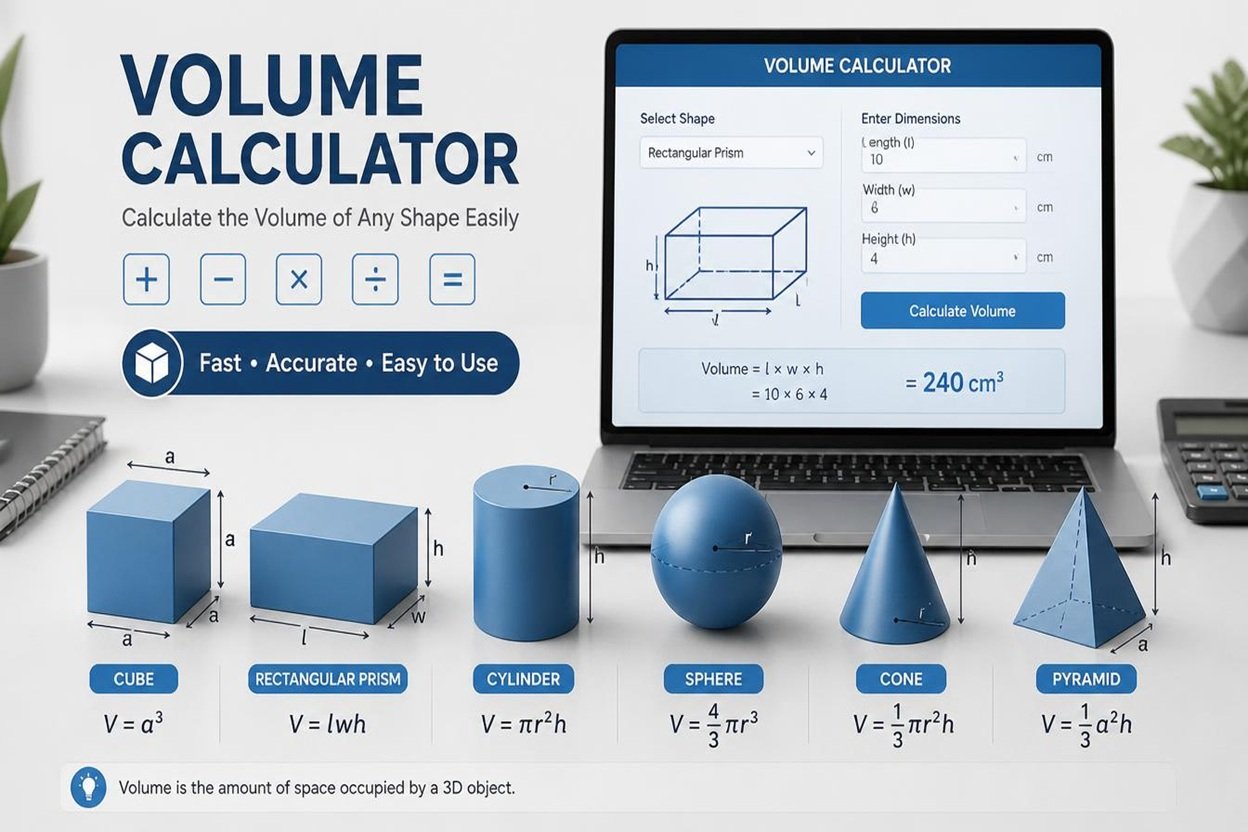
Volume Calculator
Choose a shape, enter its dimensions, and get volume, surface area, capacity in liters and gallons, and weight.
Cube
Result
Enter every dimension to see the result.
Volume in other units
Surface area
Weight
Tips for accurate results
- Measure every dimension carefully. Volume multiplies lengths together, so a 2% error in one side becomes about 6% in a cube.
- Use inside measurements for capacity (tanks, boxes, bottles). Use outside measurements for the space an object takes up.
- Radius is half of the diameter. If you measured straight across, switch the round-dimension setting to Diameter.
- You can mix units. Each field has its own unit menu, so 2 m by 80 cm by 3 ft works.
- For irregular objects, split them into simple shapes, calculate each one, and add the volumes.
Suggestions
- Ordering concrete, soil, gravel or mulch? Add 5–10% for waste and uneven ground.
- US and UK gallons are different. A UK gallon is about 20% larger, so check which one you need.
- 1 liter equals 1,000 cm³, and 1 m³ equals 1,000 liters.
- Weights use typical densities. Check your supplier’s figure for an exact number, or enter your own density.
- Pyramid and triangular prism assume a centered apex and an isosceles triangle. Ellipsoid surface area is an approximation.
Volume Calculator: Calculate the Volume of Any Shape Easily
Calculating the volume of an object is important in mathematics, construction, engineering, science, and everyday life. Whether you want to find the capacity of a water tank, calculate the space inside a box, or determine how much material is needed for a construction project, a Volume Calculator can make the process quick and easy.
A volume calculator is an online tool that calculates the amount of three-dimensional space occupied by an object. Instead of solving complicated mathematical formulas manually, you can enter the required measurements and get an accurate result within seconds.
This tool is useful for students, teachers, engineers, builders, homeowners, and anyone who needs to measure the volume of an object. In this article, you will learn what a volume calculator is, how it works, which formulas it uses, and why it is helpful for different purposes.
What Is a Volume Calculator?
A volume calculator is a digital tool that determines the volume of different three-dimensional shapes. Depending on the selected shape, you may need to enter measurements such as length, width, height, radius, or diameter.
The calculator uses the appropriate mathematical formula to produce the result. Most volume calculators support common shapes, including cubes, rectangular prisms, cylinders, spheres, cones, and pyramids.
For example, if you want to calculate the volume of a rectangular box, you only need to enter its length, width, and height. The calculator will multiply these measurements and display the result.
Online volume calculators are especially useful because they reduce manual calculations, save time, and help users avoid common mathematical mistakes.
How Does a Volume Calculator Work?
Using a volume calculator is simple, even if you do not have advanced mathematical knowledge. Most tools follow a straightforward process.
- Select a shape: Choose the object you want to measure, such as a cube, cylinder, or sphere.
- Enter the measurements: Provide the required dimensions in the available fields.
- Choose the units: Select centimeters, meters, inches, feet, or another supported unit.
- Calculate the volume: Click the calculate button to process your measurements.
- View the result: The tool displays the calculated volume in the selected or converted unit.
For example, suppose a rectangular box has a length of 5 meters, a width of 3 meters, and a height of 2 meters.
The formula is:
Volume = Length × Width × Height
Therefore:
5 × 3 × 2 = 30 cubic meters.
The volume of the box is 30 m³. A volume calculator performs this calculation automatically.
Volume Formulas for Different Shapes
Different three-dimensional shapes require different formulas. Understanding these formulas helps you see how a volume calculator produces its results.
1. Cube Volume Calculator
A cube has six equal square faces. Its length, width, and height are all equal.
Formula: Volume = Side³
For example, if each side measures 4 cm:
4 × 4 × 4 = 64 cm³.
The volume of the cube is 64 cubic centimeters.
2. Rectangular Prism Volume Calculator
A rectangular prism is a box-shaped object, such as a storage container, brick, or room.
Formula: Volume = Length × Width × Height
If the length is 8 cm, the width is 5 cm, and the height is 3 cm, the volume is 120 cm³.
3. Cylinder Volume Calculator
A cylinder has two circular ends and a curved surface. Water tanks, cans, and pipes are common examples.
Formula: Volume = π × Radius² × Height
If a cylinder has a radius of 3 cm and a height of 10 cm, its volume is approximately 282.74 cm³.
4. Sphere Volume Calculator
A sphere is a perfectly round three-dimensional object, such as a ball.
Formula: Volume = (4/3) × π × Radius³
For a sphere with a radius of 3 cm, the volume is approximately 113.10 cm³.
5. Cone Volume Calculator
A cone has a circular base and a pointed top. Ice cream cones and some storage containers have this shape.
Formula: Volume = (1/3) × π × Radius² × Height
For a cone with a radius of 3 cm and a height of 6 cm, the volume is approximately 56.55 cm³.
6. Pyramid Volume Calculator
A pyramid has a base and triangular sides that meet at a single point. The formula depends on the area of its base.
Formula: Volume = (1/3) × Base Area × Height
If the base area is 36 cm² and the perpendicular height is 9 cm, the volume is 108 cm³.
Benefits of Using an Online Volume Calculator
An online volume calculator offers several advantages for personal, educational, and professional use.
Saves Time
Manual calculations can take time, especially when dealing with complex shapes or large measurements. An online tool produces results quickly after you enter the required values.
Improves Calculation Accuracy
A calculator applies the appropriate formula automatically. This reduces arithmetic mistakes, although incorrect measurements or unit selections can still produce incorrect results.
Easy for Beginners
You do not need to memorize every mathematical formula. Most tools guide you through the process by asking for the dimensions required for each shape.
Supports Different Units
Many calculators support multiple measurement units, including meters, centimeters, millimeters, inches, and feet. Some also convert the final result into other volume units.
Useful for Different Projects
Students can solve homework problems, builders can estimate material quantities, and homeowners can calculate the capacity of containers or tanks.
Practical Uses of a Volume Calculator
A volume calculator is helpful in many real-world situations.
- Education: Students can practice geometry and check mathematical answers.
- Construction: Builders can estimate the volume of concrete, excavation areas, and other materials.
- Shipping and storage: Businesses can estimate the space required for boxes, packages, and containers.
- Water tanks: Homeowners can calculate tank capacity using the tank's dimensions.
- Manufacturing: Engineers can calculate the volume of components and products.
- Gardening: Users can estimate the soil needed for rectangular or cylindrical planters.
- Science: Researchers and students can calculate the volumes of regular three-dimensional objects.
For irregular objects, the calculation may require specialized methods, such as water displacement or numerical approximation.
Understanding Volume Measurement Units
Volume is measured in cubic units because it describes three-dimensional space.
Common units include:
- Cubic millimeters (mm³)
- Cubic centimeters (cm³)
- Cubic meters (m³)
- Cubic inches (in³)
- Cubic feet (ft³)
- Liters (L)
- Milliliters (mL)
One important conversion is that 1 liter equals 1,000 cubic centimeters. Also, 1 cubic meter equals 1,000 liters.
Always make sure your measurements use compatible units before calculating volume. For example, convert centimeters to meters when working with dimensions that must be expressed in meters.
Tips for Getting Accurate Results
To get reliable results from a volume calculator, follow these simple tips:
- Measure each dimension carefully before entering it.
- Select the correct shape and formula.
- Use consistent units for all dimensions.
- Enter the radius rather than the diameter when the calculator requests a radius.
- Check whether the height means perpendicular height, especially for cones and pyramids.
- Review the final unit to ensure the result makes sense.
- For practical projects, allow for material waste, filling limits, and measurement tolerances where necessary.
Remember that the accuracy of the answer depends on the quality of the measurements you provide.
Conclusion
A Volume Calculator is a practical and convenient tool for calculating the volume of common three-dimensional shapes. It helps users find results quickly, reduces manual calculation errors, and makes mathematical formulas easier to apply.
Whether you are a student learning geometry, a builder estimating materials, or a homeowner checking the capacity of a tank, an online volume calculator can simplify your work. By entering the correct dimensions and selecting the appropriate units, you can calculate volume in just a few steps.
Use a volume calculator whenever you need a quick estimate of three-dimensional space, and always verify your measurements before relying on the result for an important project.
Related Tools
Also visit our Payoff Calculator Website at: All Payoff Calculators
FAQs About Volume Calculator
1. What is a Volume Calculator?
A Volume Calculator is an online tool that helps you calculate the volume of three-dimensional shapes, such as cubes, cylinders, spheres, cones, and rectangular boxes.
2. How do I calculate the volume of an object?
The formula depends on the shape. For a rectangular box, multiply its length by its width by its height. For a cylinder, multiply π by the radius squared and the height.
3. Which units can I use in a Volume Calculator?
Common volume units include cubic meters (m³), cubic centimeters (cm³), cubic feet (ft³), cubic inches (in³), liters (L), and milliliters (mL). Make sure your measurements use compatible units.
4. Can I use a Volume Calculator for construction projects?
Yes. Builders and contractors can use a volume calculator to estimate the amount of concrete, soil, sand, and other materials needed for a project. Actual material requirements may vary due to waste and other factors.
5. Is an online Volume Calculator free to use?
Many online volume calculators are completely free. They allow users to enter measurements, select a shape, and calculate volume without performing complicated calculations manually.
